Convonet Voice AI Productivity System
Google Cloud Run · FastAPI microservices · WebRTC/WebSocket voice (no LiveKit) · Multi-LLM (Claude, Gemini, OpenAI) · Domain Agents (Productivity, Mortgage, Healthcare, Restaurant/Hanok) · MCP Tools · Agent Monitor · Call Transfer (Twilio/FusionPBX) · Sentry
Technical Architecture
System Architecture Overview
Complete System Flow Diagrams
System Architecture Diagram
Complete system flow overview with all components and their relationships
View Full Diagram →Sequence Diagram
Step-by-step flow (52 steps) showing interactions between all components
View Full Diagram →/webrtc/ws) → PIN Auth (PostgreSQL or env) → Batch STT (Deepgram) → agent-llm-service HTTP (/agent/process) → LangGraph · Multi-LLM · MCP Tools → TTS (Deepgram) → transcript_final, agent_final, audio_chunk → User. No LiveKit on GCP.
Google Cloud Run Microservices
Convonet runs as five FastAPI microservices on Google Cloud Run, exposed under a single domain v2.convonetai.com (plus optional Hanok hostname) with path-based routing.
- • voice-gateway-service: WebSocket
/webrtc/ws, Twilio webhooks; STT → agent-llm HTTP → TTS (no LiveKit). - • agent-llm-service:
POST /agent/process, LangGraph, Multi-LLM, MCP tools, intent routing (Todo/Mortgage/Healthcare/Hanok). - • call-center-service: Landing, /call-center, /voice_assistant, /mortgage_dashboard, /agent-monitor, /tool-execution, doc pages.
- • crm-integration-service: SuiteCRM (patient, meeting, case, note).
- • hanok-table-service: Restaurant reservation APIs/webhooks (
/api/reservations/*,/webhooks/hanok_table/*).
Path-Based Routing (v2.convonetai.com)
Architecture Flow: Five FastAPI microservices on Google Cloud Run (v2.convonetai.com + hanok.convonetai.com). Voice via WebSocket to voice-gateway (no LiveKit): PIN auth (PostgreSQL or env), batch STT/TTS (Deepgram), HTTP to agent-llm for LangGraph and multi-LLM (Claude, Gemini, OpenAI), domain agents (Productivity, Mortgage, Healthcare, Hanok), MCP tools, and Hanok reservation APIs on hanok-table-service. Agent Monitor (tool calls, voice_timing) and call transfer (Twilio → FusionPBX). Sentry for monitoring.
Overview
The Convonet Voice AI Productivity System is an enterprise-grade platform running on Google Cloud Run as five FastAPI microservices. It combines multi-LLM AI (Claude, Gemini, OpenAI), WebSocket-based voice (no LiveKit on GCP), domain-specific agents (Productivity, Mortgage, Healthcare, Restaurant/Hanok), and intelligent call center integration. Voice flows through the voice-gateway WebSocket at /webrtc/ws: PIN authentication (PostgreSQL or env), batch STT/TTS (Deepgram), and HTTP to agent-llm for LangGraph and MCP tools.
The system enables teams to manage todos, mortgage workflows, healthcare intakes, and Hanok restaurant reservations via voice and web dashboards, with seamless transfer to human agents (Twilio → FusionPBX). Agent Monitor shows tool calls and voice response timing. Services are exposed under v2.convonetai.com (and optionally hanok.convonetai.com) with path-based routing/custom-domain mapping; Redis and PostgreSQL (e.g. Render) back session and application data.
Core Technologies
- • FastAPI microservices on Google Cloud Run
- • LangGraph for agent orchestration; Multi-LLM: Claude, Gemini, OpenAI
- • Model Context Protocol (MCP) – domain tools (todo, mortgage, healthcare, hanok reservations, transfer)
- • WebSocket voice: voice-gateway at /webrtc/ws (no LiveKit on GCP)
- • Deepgram batch STT and TTS; optional ElevenLabs, Cartesia
- • PostgreSQL (e.g. Render): users_anthropic, todos, mortgage
- • PIN authentication (users_anthropic.voice_pin or VOICE_PIN env)
- • Agent Monitor: tool calls and voice_timing (Redis-backed)
- • Twilio and FusionPBX for call transfer; JsSIP at /call-center
- • Single domain v2.convonetai.com with path-based routing
- • Sentry error monitoring
Key Features
- • Domain agents: Productivity (Todo), Mortgage, Healthcare (intent-based routing)
- • WebSocket voice pipeline: STT → agent-llm HTTP → TTS; metadata (voice_timing) for Agent Monitor
- • Agent Monitor: real-time tool calls and voice response timing (call-center-service)
- • PIN-based voice authentication (DB or env)
- • Call transfer: AI → Twilio → FusionPBX Extension 2001 → JsSIP dashboard
- • 38 MCP tools; mortgage dashboard and tool-execution dashboard
- • Call center UI at /call-center (SIP config via SIP_DOMAIN, SIP_WSS_PORT)
- • CRM integration service for SuiteCRM (patient, meeting, case, note)
- • Production: Cloud Run with scale-to-zero; Redis and PostgreSQL external
Recent Updates & Improvements (February 2026)
GCP Cloud Run Microservices
- ✓ Five FastAPI services: voice-gateway, agent-llm, call-center, crm-integration, hanok-table
- ✓ Single domain v2.convonetai.com with path-based routing
- ✓ Voice via WebSocket /webrtc/ws (no LiveKit on GCP)
- ✓ Agent-llm: /agent/process, LangGraph, MCP tools
- ✓ Scale-to-zero; Redis and PostgreSQL (e.g. Render) external
Call Transfer to FusionPBX
- ✓ Seamless AI → Human agent transfer
- ✓ FusionPBX extension 2001 integration
- ✓ SIP/WSS connectivity (Google Cloud VM)
- ✓ Transfer detection via phrases or tool
- ✓ Department routing (support, sales, etc.)
WebSocket Voice + Agent Monitor
- ✓ Voice-gateway WebSocket /webrtc/ws (no LiveKit on GCP)
- ✓ Batch STT (Deepgram) → agent-llm HTTP → TTS (Deepgram)
- ✓ Metadata (voice_timing, source) sent to agent for Agent Monitor
- ✓ Domain agents: Productivity, Mortgage, Healthcare, Restaurant/Hanok (intent routing)
- ✓ Agent Monitor: tool calls and voice response timing (Redis)
Composio (optional)
- Optional external tools (Slack, GitHub, Gmail, Notion, etc.)
- Not required for GCP core voice/agent/call-center flows
Sentry Integration
- ✓ Real-time error tracking & alerts
- ✓ Performance monitoring (agent processing time)
- ✓ User context & session tracking
- ✓ Timeout & thread reset tracking
- ✓ Production-grade observability
Timeout Optimization
- ✓ Tool timeout: 8s (from 20s)
- ✓ Agent timeout: 10s (from 25s)
- ✓ Webhook timeout: 12s (from 30s)
- ✓ Stays under Twilio's 15s HTTP limit
- ✓ Thread reset on timeout prevents errors
WebRTC Call Center
- ✓ JsSIP v3.10.1 browser softphone
- ✓ WebSocket Secure (WSS) on port 7443
- ✓ Agent dashboard with SIP registration
- ✓ Call control (answer, hold, transfer, hangup)
- ✓ Google Cloud firewall configured
Automatic Error Recovery
- ✓ Thread reset with timestamped IDs
- ✓ BrokenResourceError handling
- ✓ tool_call_id incomplete error recovery
- ✓ In-memory reset tracking (_reset_threads)
- ✓ No cascading failures
Performance Optimization
- ✓ Removed Google Calendar sync delay
- ✓ Simplified JSON responses (no MCP breaks)
- ✓ Agent processing time measurement
- ✓ Transaction tracking per voice call
- ✓ Custom Sentry metrics & measurements
GCP WebSocket Voice Architecture
On Google Cloud Run, voice uses FastAPI WebSocket only—no LiveKit. The browser connects to voice-gateway-service at /webrtc/ws. After PIN auth (PostgreSQL or env), the pipeline runs: batch STT (Deepgram) → HTTP POST to agent-llm-service → TTS (Deepgram) → transcript_final, agent_final, and audio_chunk back to the client. Domain agents (Productivity, Mortgage, Healthcare, Hanok) and Agent Monitor (tool calls, voice_timing) are unchanged.
/voice_assistant
· WebSocket: /webrtc/ws (voice-gateway-service)
Voice Assistant Architecture (GCP)
WebSocket Voice Processing Flow
Flow: Browser → voice-gateway WebSocket → PIN Auth (PostgreSQL or env) → Batch STT (Deepgram) → agent-llm-service HTTP → LangGraph · Multi-LLM · MCP Tools → TTS (Deepgram) → transcript_final, agent_final, audio_chunk → User. No LiveKit on GCP.
Voice Flow Phases
View Detailed Sequence Diagram →Phase 1: Authentication
WebSocket connect, PIN auth (PostgreSQL or VOICE_PIN env)
Phase 2: Conversation Loop
Record → Batch STT → agent-llm HTTP → TTS → playback
Phase 3: Transfer Request
User requests transfer; agent-llm returns transfer_marker
Phase 4: Twilio Transfer
Voice-gateway → Twilio → FusionPBX → Agent Dashboard (JsSIP)
GCP architecture: Voice uses FastAPI WebSocket to voice-gateway-service only. No LiveKit, no Socket.IO. PIN (PostgreSQL or env), batch STT/TTS (Deepgram), HTTP to agent-llm for LangGraph and MCP tools. Agent Monitor (tool calls, voice_timing) and transfer to FusionPBX via Twilio unchanged.
Component Interaction (GCP)
| Component | Input From | Output To | Purpose |
|---|---|---|---|
| User Browser | User voice | Voice Gateway (WS) | Captures audio (MediaRecorder), displays UI |
| Voice Gateway | Browser, Deepgram, Agent LLM | Browser, Deepgram, Agent LLM | WebSocket /webrtc/ws, STT→agent→TTS pipeline |
| PIN Auth | Voice Gateway | PostgreSQL (or env) | Validates PIN (users_anthropic or VOICE_PIN) |
| Deepgram STT/TTS | Voice Gateway | Voice Gateway | Batch transcription and TTS |
| Agent LLM Service | Voice Gateway (HTTP) | Voice Gateway, Redis | LangGraph, Multi-LLM, MCP tools, Agent Monitor |
| Twilio / FusionPBX | Voice Gateway | Agent Dashboard | Call transfer to JsSIP |
| Agent Dashboard | FusionPBX | User | JsSIP at /call-center |
WebSocket Voice Interface
- ✓ Browser: getUserMedia + MediaRecorder (WebM)
- ✓ FastAPI WebSocket at /webrtc/ws
- ✓ Base64 audio chunks; transcript_final, agent_final, audio_chunk
Session & Agent Monitor
- ✓ In-memory session state (voice-gateway)
- ✓ Redis: agent-llm writes interactions (tool_calls, voice_timing)
- ✓ Call-center serves /agent-monitor APIs from Redis
Composio (optional)
- Optional external tools; not required for GCP core flows
Module Structure (GCP Cloud Run)
Deployment & Services (v2.convonetai.com + hanok.convonetai.com)
Project Root/
├── cloudbuild.yaml                 # Build & deploy all 5 services to Cloud Run
├── cloudbuild-hanok-table.yaml     # Deploy only hanok-table-service
├── cloudbuild-callcenter.yaml      # Deploy only call-center-service
├── docker/                         # Per-service Dockerfiles
│   ├── voice-gateway.Dockerfile
│   ├── agent-llm.Dockerfile
│   ├── call-center.Dockerfile
│   ├── crm-integration.Dockerfile
│   └── hanok-table.Dockerfile
├── hanok_table/                    # Hanok reservation FastAPI package
├── templates/                      # Served by call-center-service
│   ├── index.html, voice_assistant.html, call_center.html
│   ├── agent_monitor_dashboard.html, mortgage_dashboard.html
│   ├── convonet_tech_spec.html, convonet_system_architecture.html, convonet_sequence_diagram.html
│   └── ...
└── convonet/
    ├── voice_gateway_service.py    # FastAPI: /webrtc/ws, /twilio/* (STT→agent-llm→TTS, transfer)
    ├── agent_llm_service.py        # FastAPI: /agent/process, /convonet_todo/* (LangGraph, MCP, mortgage)
    ├── call_center_service.py      # FastAPI: /, /call-center, /voice_assistant, /agent-monitor, docs
    ├── routes.py                   # Agent logic, LangGraph, tool execution (used by agent_llm_service)
    ├── agent_monitor.py            # Redis-backed interactions (tool_calls, voice_timing)
    ├── redis_manager.py            # Redis session, Agent Monitor, transfer context cache
    ├── deepgram/                   # STT/TTS (used by voice_gateway_service)
    ├── mcps/local_servers/          # MCP tools (db_todo, db_mortgage, db_hanok_table, call_transfer, etc.)
    ├── models/                     # SQLAlchemy (user_models: users_anthropic, voice_pin)
    └── ...                         # Legacy Flask/Socket.IO/LiveKit code not used on GCP
Path-based routing on v2.convonetai.com (and/or custom host mapping for hanok.convonetai.com) directs requests to the appropriate Cloud Run service.
Database (PostgreSQL)
Used by agent-llm-service (e.g. Render.com PostgreSQL). Connection via DB_URI; optional RENDER_POSTGRES_HOST_SUFFIX for Render host normalization.
users_anthropic
Voice PIN auth; voice_pin column for PIN validation.
todos_convonet
Todo CRUD via MCP/db_todo.
reminders_convonet
Reminders via MCP.
Mortgage / Healthcare
Applications, patients, etc. (see mcps/local_servers).
Full schema and migrations are in convonet/models/ and migrations/.
LangGraph Agent Architecture
LangGraph Workflow Diagram
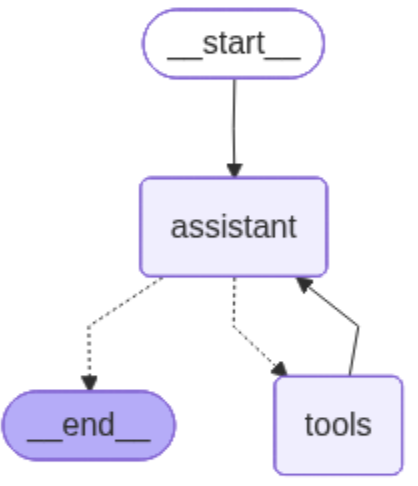
LangGraph Workflow: The agent can either continue to use tools or end the conversation based on user input and context.
Agent Components
- • TodoAgent Class: Main agent orchestrator with lazy initialization
- • StateGraph: Manages conversation flow and state
- • Assistant Node: GPT-4 reasoning and response generation
- • Tool Node: Executes 38 MCP tools
- • Conditional Edges: Routes between nodes based on tool calls
- • InMemorySaver: Checkpointer for state persistence
State Management
- • AgentState: Conversation state with message history
- • Message History: Maintains context across turns
- • Customer ID: User identification for multi-tenant
- • Thread ID: Conversation thread tracking
- • Lazy Loading: Prevents circular imports
- • ExceptionGroup Handling: Robust error recovery
Model Context Protocol (MCP) Integration
MCP provides a standardized way for AI agents to interact with external tools and services. On GCP, agent-llm-service uses MCP to expose domain tools: database operations (todos, reminders, calendar), team management, mortgage/healthcare, Hanok reservation operations (via hanok-table-service), call transfer to FusionPBX, and Google Calendar. STT/TTS are handled by voice-gateway (Deepgram), not MCP.
MCP Server Configuration
{
  "mcpServers": {
    "db": {
      "command": "python",
      "args": ["./convonet/mcps/local_servers/db_todo.py"],
      "transport": "stdio",
      "env": {
        "DB_URI": "${DB_URI}",
        "GOOGLE_OAUTH2_TOKEN_B64": "${GOOGLE_OAUTH2_TOKEN_B64}",
        "GOOGLE_CLIENT_ID": "${GOOGLE_CLIENT_ID}",
        "GOOGLE_CLIENT_SECRET": "${GOOGLE_CLIENT_SECRET}"
      }
    }
  }
}
Available MCP Tools (38)
Todo Management (5)
- • create_todo
- • get_todos
- • complete_todo
- • update_todo
- • delete_todo
Team Tools (8)
- • create_team
- • get_teams
- • get_team_members
- • create_team_todo
- • add_team_member
- • remove_team_member
- • change_member_role
- • search_users
Reminders (4)
- • create_reminder
- • get_reminders
- • update_reminder
- • delete_reminder
Calendar (6)
- • create_calendar_event
- • get_calendar_events
- • update_calendar_event
- • delete_calendar_event
- • sync_google_calendar_events
- • test_google_calendar
Call Transfer (2)
- • transfer_to_agent
- • get_available_departments
Enhanced LangGraph Tool Calls
The LangGraph implementation provides intelligent tool calling capabilities with dynamic tool selection and error handling. The agent automatically chooses appropriate tools based on user intent and maintains conversation context for seamless interactions.
Tool Calls Flow Diagram
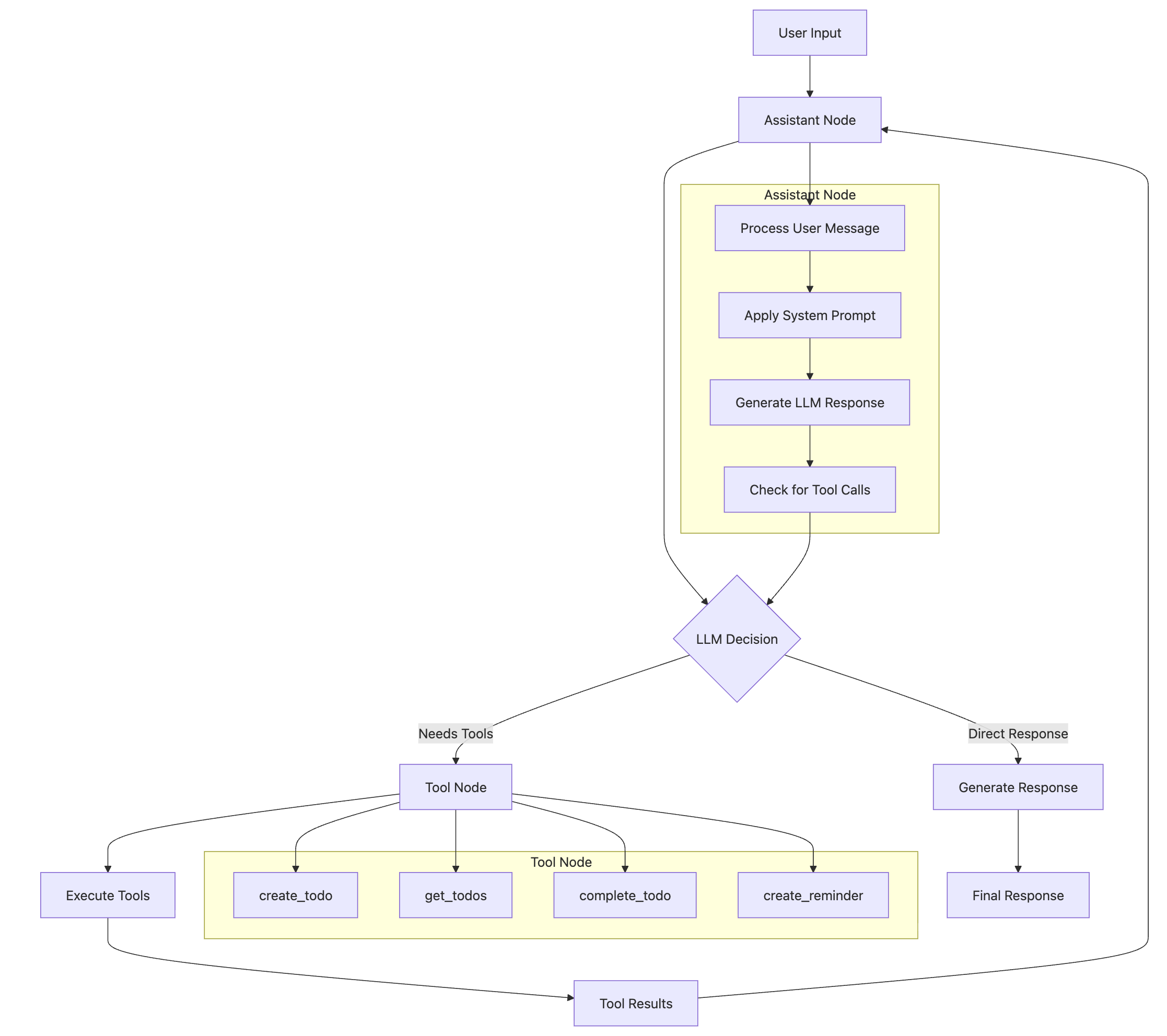
Tool Calls Flow: LangGraph implementation showing dynamic tool selection and intelligent orchestration of MCP tools.
Tool Calls Features
MCP Integration
- • Database operations via MCP servers
- • Google Calendar synchronization
- • Team collaboration tools
- • Real-time tool discovery (38 tools)
- • Secure tool communication via stdio
- • Lazy loading for performance
Error Handling
- • Graceful tool failure recovery
- • ExceptionGroup unwrapping
- • 20s timeout per tool
- • 30s overall agent timeout
- • Fallback strategies
- • User-friendly error messages
Tool Features: Intelligent tool calling system with error recovery, timeout management, and seamless MCP integration.
Core Tool Calling Capabilities
- • Dynamic Tool Selection: LLM intelligently chooses appropriate tools based on user intent
- • Error Recovery: Graceful handling of tool failures with fallback strategies
- • Context Awareness: Tools access conversation history and maintain state
- • Streaming Responses: Real-time tool execution updates for better user experience
- • Async Execution: Non-blocking tool calls with proper timeout management
- • ExceptionGroup Handling: Unwraps and logs complex async exceptions
JWT Authentication System
Authentication Flow
Security Features
- • Password Hashing: Bcrypt with automatic salt
- • JWT Tokens: HS256 algorithm with secret key
- • Token Expiry: 30 min access, 7 day refresh
- • Authorization: @require_auth decorator
- • Role Validation: @require_role decorator
- • Team Membership: @require_team_member decorator
- • Auto Logout: Frontend handles expired tokens
JWT Token Structure
{
  "user_id": "uuid",
  "email": "user@example.com",
  "roles": ["user"],
  "team_id": "uuid",
  "type": "access",
  "exp": 1728589200,  // 30 minutes from issue
  "iat": 1728587400   // issued at timestamp
}
Redis (GCP)
Redis is used by voice-gateway-service and agent-llm-service (e.g. Redis Cloud). Configure via REDIS_HOST, REDIS_PORT, REDIS_PASSWORD.
- • Agent Monitor: agent-llm writes interactions (tool_calls, voice_timing, metadata) for the /agent-monitor dashboard.
- • Transfer context: On transfer to human agent, voice-gateway caches conversation_history and customer profile (e.g.
callcenter:customer:{extension}:{call_sid}) for call-center UI. - • Session/audio: Optional session and audio buffer storage for voice pipeline.
API Endpoints (v2.convonetai.com)
Paths are served via path-based routing on v2.convonetai.com, with optional custom-domain mapping for hanok-table-service (hanok.convonetai.com).
call-center-service
GET /LandingGET /voice_assistant,/call-center,/agent-monitor,/tool-execution,/mortgage_dashboardGET /convonet_tech_spec,/convonet_system_architecture,/convonet_sequence_diagramGET/POST /call-center/api/*(agent status, login, call actions, customer data from Redis)GET /agent-monitor/api/stats,/agent-monitor/api/interactions
voice-gateway-service
WebSocket /webrtc/ws(PIN auth, STT→agent-llm→TTS, greeting, processing status, barge-in)POST /twilio/process_audio,/twilio/transfer_callback
agent-llm-service
POST /agent/process(LangGraph, multi-LLM, MCP tools, metadata.voice_timing, transfer_context)GET /convonet_todo/api/mortgage/applications,/convonet_todo/api/mortgage/applications/{id}
crm-integration-service
/patient/*,/meeting/create, etc. (SuiteCRM)
hanok-table-service
GET/POST /healthhealth check/api/reservations/*reservation create/read/update/cancel/webhooks/hanok_table/*webhook variables/call-control/reservation/status,/reserve-onlineUI endpoints
Call Center Agent Dashboard
A complete browser-based SIP phone client with ACD (Automatic Call Distribution) capabilities, providing enterprise-grade call center management features for handling voice assistant transfers and customer support calls.
Agent Management
- ✓ Secure agent authentication
- ✓ SIP credential management
- ✓ Session management
- ✓ Agent state tracking (Ready/Not Ready/On Call/Wrap Up)
- ✓ Time-in-state tracking
- ✓ Activity logging
Call Handling
- ✓ Incoming call notifications
- ✓ Caller ID display
- ✓ Answer/Reject controls
- ✓ Call hold/unhold
- ✓ Call transfer (blind & attended)
- ✓ Outbound dialing
- ✓ Call duration tracking
Customer Data Popup
- ✓ Automatic customer info display
- ✓ Customer ID & contact info
- ✓ Account status & tier
- ✓ Last contact date
- ✓ Open tickets/cases
- ✓ Lifetime value
- ✓ Agent notes
SIP Integration
- ✓ Browser-based SIP client (JsSIP)
- ✓ WebRTC audio support
- ✓ WebSocket Secure (WSS)
- ✓ RFC 3261 compliant
- ✓ Multiple codec support (G.711, Opus, G.722)
- ✓ NAT traversal (STUN/TURN)
Dashboard Interface
- ✓ Agent status panel
- ✓ Call control panel
- ✓ 12-key dialpad
- ✓ Call history display
- ✓ Real-time status updates
- ✓ Responsive design (desktop/tablet/mobile)
Monitoring & Reporting
- ✓ Agent metrics (calls handled, duration)
- ✓ Call metrics (answer rate, wait time)
- ✓ Real-time monitoring
- ✓ Activity timeline
- ✓ Availability percentage
Agent States
Voice Assistant Transfer Integration
When a user requests to speak with a human agent during a WebRTC voice assistant session, the system automatically transfers the call to the Call Center Agent Dashboard:
API Endpoints
Agent Management
POST /call-center/api/agent/loginPOST /call-center/api/agent/logoutPOST /call-center/api/agent/readyPOST /call-center/api/agent/not-readyGET /call-center/api/agent/status
Call Handling
POST /call-center/api/call/ringingPOST /call-center/api/call/answerPOST /call-center/api/call/dropPOST /call-center/api/call/holdPOST /call-center/api/call/transfer
Customer Data
GET /call-center/api/customer/{id}
Access: /call-center/
Call Center Agent Dashboard:
Browser-based SIP client requiring no installation. Compatible with Chrome, Firefox, Edge, and Safari. Integrates with FusionPBX for call routing and transfer from WebRTC voice assistant sessions.
Twilio & Voice (GCP)
Browser voice: Use /voice_assistant → WebSocket /webrtc/ws (voice-gateway-service). PIN auth (PostgreSQL or env), Deepgram STT/TTS, greeting after login, “please wait” + elapsed timer during processing, barge-in (Start stops playback and starts recording).
Phone (Twilio): Twilio webhooks target voice-gateway-service at POST /twilio/process_audio. STT/TTS are Deepgram (not Twilio/Polly). On transfer intent, agent-llm returns transfer_marker; voice-gateway returns TwiML <Dial><Sip> to FusionPBX (e.g. extension 2001). Config: VOICE_GATEWAY_PUBLIC_URL, FUSIONPBX_SIP_DOMAIN, TRANSFER_TIMEOUT. Callback /twilio/transfer_callback handles dial status.
Transfer context (conversation_history, user_id) is cached in Redis for the call-center UI. See docs/CLOUD_RUN_ENV.md for Twilio/FusionPBX env vars.
Validation
Validate the GCP deployment via /voice_assistant (WebSocket voice, PIN, greeting, barge-in), /agent-monitor (tool calls and voice timing), /call-center (SIP dashboard and customer popup from Redis), and /mortgage_dashboard. For phone flows, configure Twilio webhooks to VOICE_GATEWAY_PUBLIC_URL/twilio/process_audio and test transfer to FusionPBX.